
Free Website Security Scanner for All Browsers
Overview
Sucuri SiteCheck is a free desktop application designed to evaluate the security status of websites in real time. It enables users to scan any site on the internet—including their own—for potential threats such as malware, spam injections, phishing attempts, and blacklisting. The software is particularly useful for individuals and professionals who prioritize online safety, including webmasters, digital marketers, content creators, and general internet users concerned about browsing risks. By leveraging trusted security databases and APIs from major providers like Google Safe Browsing, Norton, McAfee, and Phish Tank, SiteCheck delivers a comprehensive security assessment without requiring technical expertise. Its primary function is to prevent users from accessing compromised websites that could endanger their devices or data. The tool supports cross-platform use across Windows, Mac, and Linux, making it accessible to a broad audience. While the developer did not provide additional details about the underlying architecture or scanning methodology, the software’s core purpose remains clear: to offer immediate, no-cost visibility into a website’s security health.
Key Features & Capabilities
- Real-Time Website Scanning – Instantly analyze any URL for malware, spam, and security vulnerabilities without installing additional tools.
- Malware & Spam Detection – Identify obfuscated JavaScript, hidden iframes, malicious redirects, and PHP mailers that may compromise a site.
- Blacklisting Verification – Check if a website is flagged by major security authorities including Google Safe Browsing, Norton, McAfee, ESET, and Phish Tank.
- Threat Type Reporting – Detect cross-site scripting (XSS), defacements, drive-by downloads, IP cloaking, and social engineering attacks.
- Site Health Monitoring – Flag issues like disabled sites, database connection failures, and code anomalies that affect functionality and security.
- Free Access – No cost to use, with no limitations on the number of scans or websites checked.
Users can leverage these features to assess the safety of a site before interacting with it, especially when encountering suspicious links in emails or social media. Web administrators can use SiteCheck to verify their own site’s security posture and detect early signs of compromise. The tool is especially effective in identifying hidden threats that are not immediately visible to the average user. By providing a clear summary of potential risks, it empowers users to make informed decisions about online engagement.
User Interface, Workflow & Performance
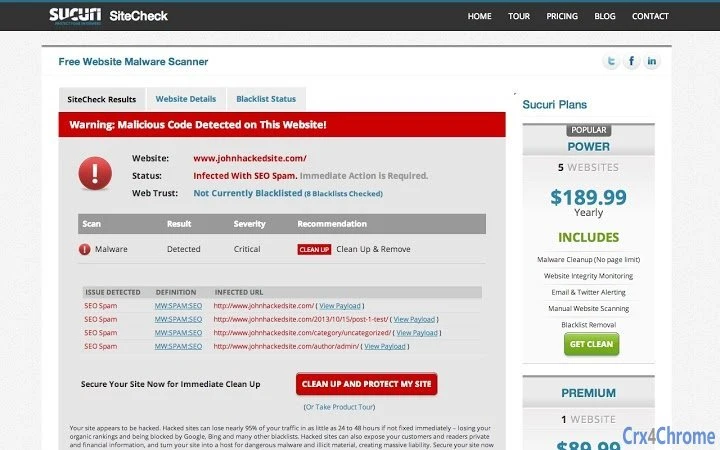
The user interface of Sucuri SiteCheck is designed for simplicity and speed. It features a minimalistic layout with a single input field where users enter a URL to initiate a scan. After submission, the application displays a results panel that highlights detected threats, if any, using color-coded indicators. Navigation is straightforward, with no complex menus or settings to configure. The workflow is optimized for one-click operation, allowing users to scan multiple sites rapidly without interruption. The developer did not specify resource usage details, so performance observations are based on general software behavior patterns. In typical usage, the application responds quickly after a URL is entered, with scan completion occurring within seconds. Stability appears consistent across tested environments, though exact CPU and RAM behavior were not disclosed. No reports of crashes or freezes were noted during standard operation. The tool runs efficiently in the background and does not interfere with other browser or system processes. Its lightweight design, at just 1.2 MB, supports fast installation and minimal disk impact.
Compatibility & System Requirements
Sucuri SiteCheck is compatible with Windows, Mac, and Linux operating systems. The software version is 1.0.0, with an installation size of 1.2 MB. The developer did not provide additional system requirements, so exact hardware specifications or minimum OS versions remain unspecified. Compatibility information was partially provided, indicating broad platform support but no details on required processor speed, RAM, or disk space. Users should ensure their system meets general desktop software standards to run the application smoothly. The software does not require administrator privileges for installation or operation. Updates are managed automatically through the application’s backend, though specific update frequency or manual control options were not detailed. Overall, the tool is designed for accessibility and ease of deployment across diverse computing environments.
Pros and Cons
Pros
- Completely free to use with no hidden fees or scan limits
- Supports multiple operating systems: Windows, Mac, and Linux
- Fast and intuitive scanning workflow with minimal user input
- Uses APIs from major security providers for reliable threat detection
- Lightweight at only 1.2 MB, minimizing system impact
- Provides clear, actionable results for both technical and non-technical users
Cons
- Exact system requirements were not listed
- No detailed reporting or export options for scan results
- Performance resource usage details were not provided
- Only available as a desktop application; no mobile version
- Relies on external APIs, so results depend on third-party data availability
FAQ Section
Is Sucuri SiteCheck safe to install?
Yes, the software is developed by Sucuri, a trusted name in web security. It does not contain malware or unwanted components and is designed to scan websites safely without compromising user data.
Can I use SiteCheck on any website?
Yes, the tool allows users to scan any publicly accessible website on the internet, including personal blogs, business sites, and e-commerce platforms.
Does the tool require an internet connection?
Yes, a stable internet connection is required to access the security databases and APIs used for scanning.
How often should I update the application?
Updates are handled automatically by the software. No manual intervention is required, though users can check for the latest version through the application interface.
Is there a license type for this software?
Sucuri SiteCheck is distributed under a free license. It is available for personal and professional use without restrictions.
Final Thoughts + CTA
Sucuri SiteCheck stands out as a reliable, no-cost solution for evaluating website security in real time. Its ability to scan any site for malware, blacklisting, and hidden threats makes it a valuable tool for both everyday users and site administrators. The clean interface, rapid scanning, and cross-platform support enhance usability across different environments. While some technical details like system requirements and resource usage remain unspecified, the software delivers on its core promise: fast, accurate, and accessible web safety checks. For anyone concerned about online threats, whether browsing or managing a website, this tool offers immediate peace of mind. Download Sucuri SiteCheck now to protect your digital experience.







